Autolab Group Registration for the CSE 331 Project
Instructions for registering your project group on Autolab.
Fill Out the Group Composition Form First
The Group Composition Form will be posted and announced in class at a later time. Please see the project overview page for additional information about project groups.
You Must Submit the Google Form
You must submit the Group Composition Form by 11:30 PM on Friday, September 18, 2026. The form will be posted and announced in class at a later time. If you do not submit the form on time, then you will not be able to register your group on Autolab and will receive a zero (0) on the entire project.
Register your group on Autolab
Groups on Autolab Will Not Be Automatically Registered
Even after submitting the Google Form for your group composition you will have to register your group on Autolab yourself as a group. Read on for instructions on how to go about this.
However, once you register your group on Autolab you will not have to form your group again for subsequent project submissions.
When You Can Register Your Group on Autolab
Your project group will be finalized by Monday, September 21, 2026 (wait for a confirmation email from Prof. Carlson). You will be able to start registering your group on Autolab by 11:45 PM on Monday, September 21, 2026.
The deadline to finish registering your group on Autolab is 11:30 PM on Monday, September 28, 2026.
You Need to Register Your Group by the Deadline
If a group is not registered by 11:30 PM on Monday, September 28, 2026 then the ENTIRE group will receive a zero (0) on the entire project.
Instructions
Please follow the instructions EXACTLY:
- Go to
Project > Group Registration - Under
Optionsclick onGroup Options, like here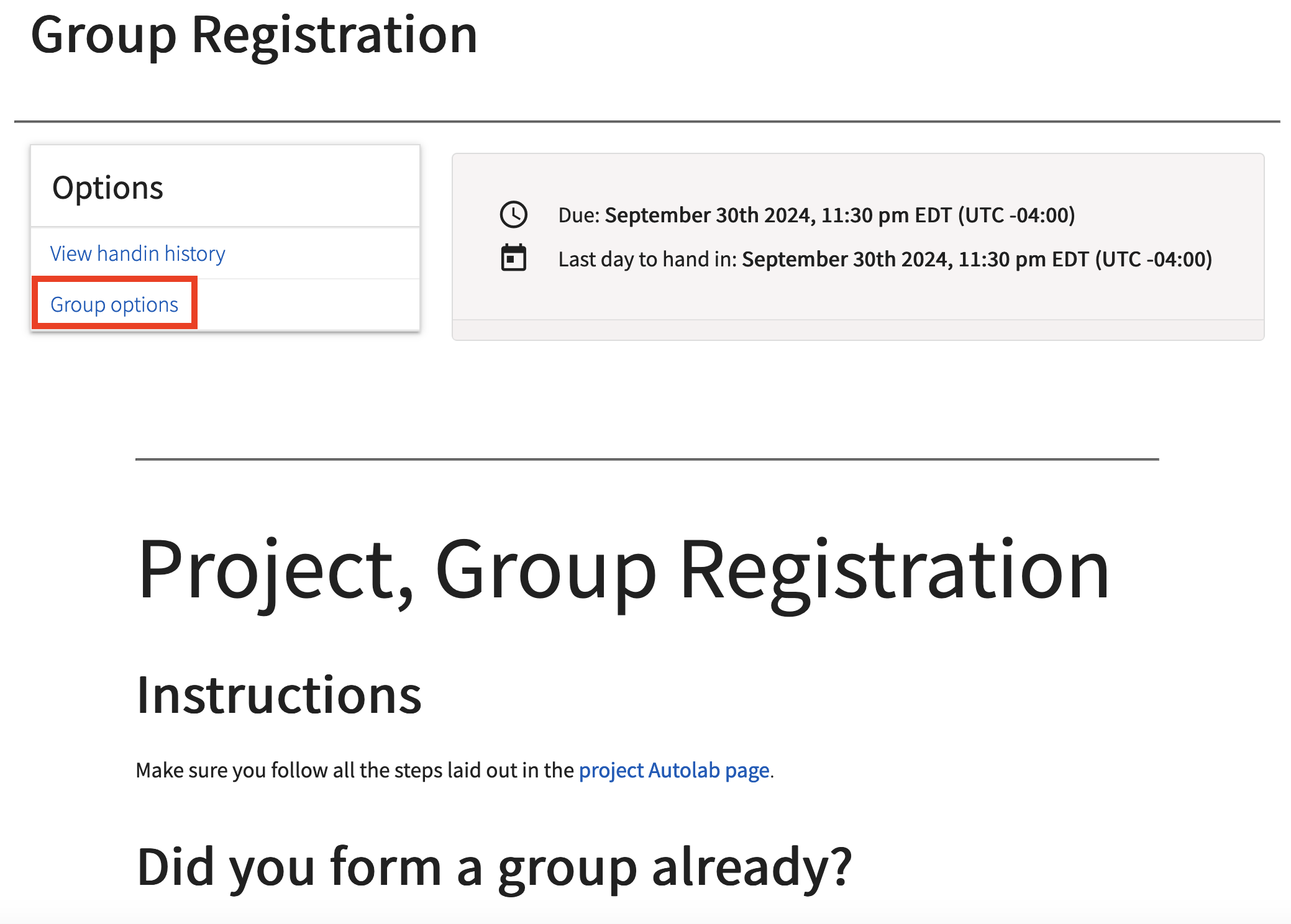
- You will then get to this screen:
Do the following:
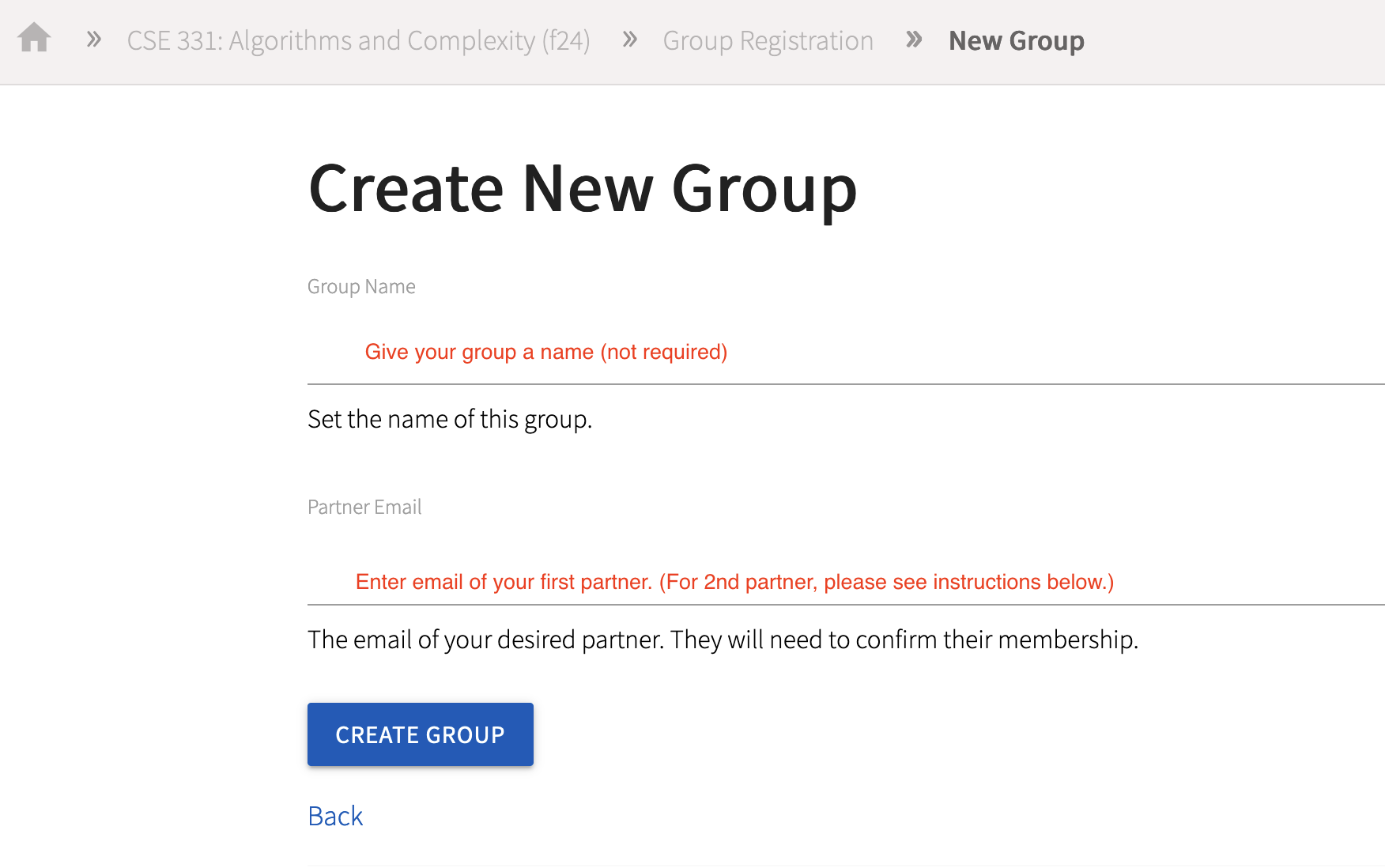
- Name your group if you want (not required)
- Enter the name of the second person in your group and then click on
Create Group. (Unless things have changed, Autolab does not accept more than one email.) - Once the group is created, add the third person to the group.
- Make sure you contact your group members to make sure they accept the invitation to your group.
- Once everyone has accepted (see the section below for more on this) your invitation only then submit your code. (More instructions on submission later on.)
- You can resubmit as many times as you want until the deadline.
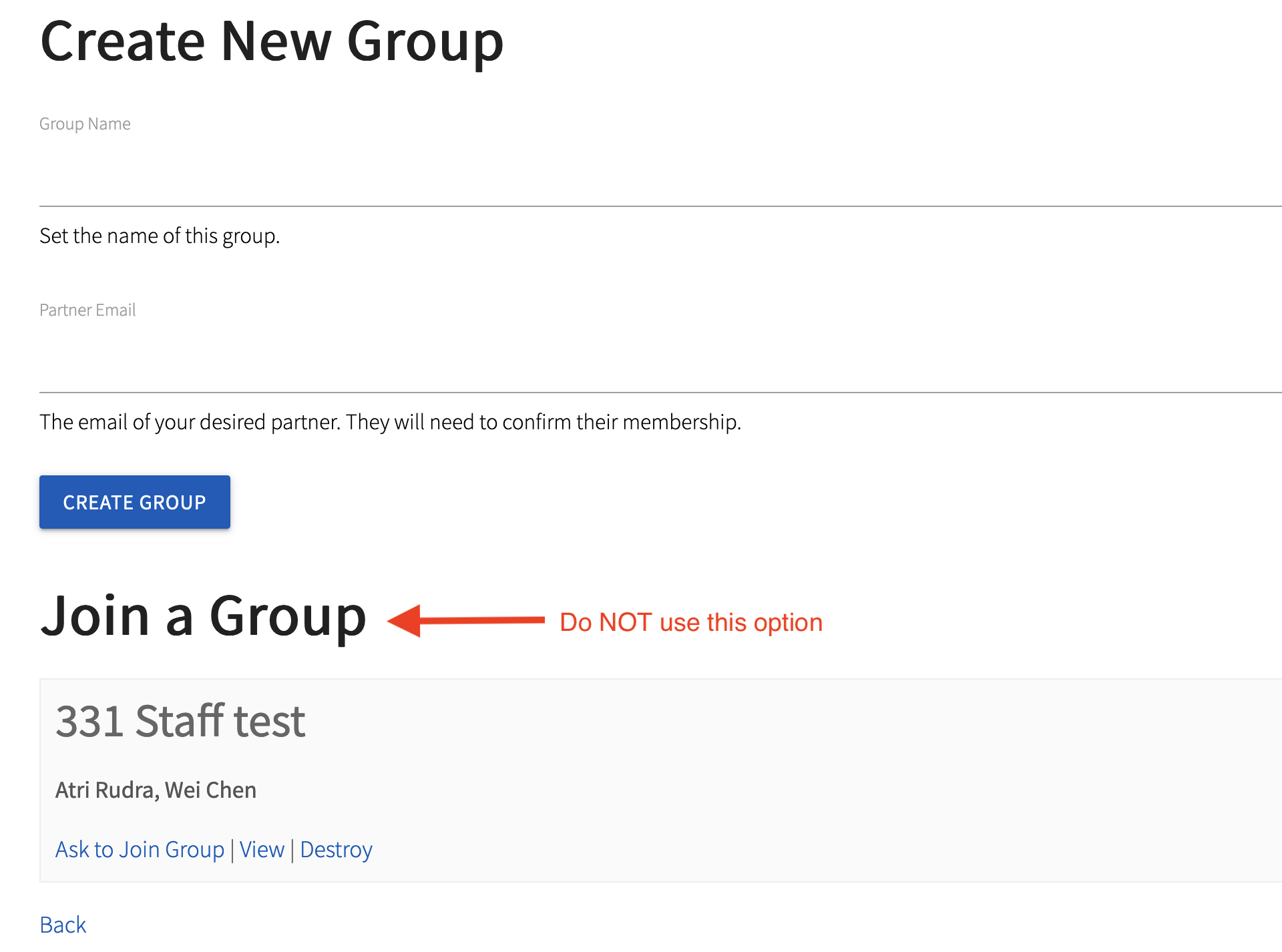
Do NOT click on Join a Group
Do NOT use the "Join a Group" feature. ONLY follow the instructions above EXACTLY.
This step can be undone but needs intervention on our part but that can cause delays and we are not responsible if you miss your deadline due to this delay.
Here is what such an option looks like (the actual group name and group members would be different in your case:
Only Form Your Official Group of Size $3$
During the process above, Autolab will allow you to form groups of size smaller than $3$ and may allow you to create a group that is not the same as your official group. We will manually check of whether the groups formed on Autolab EXACTLY match the official groups. If your group on Autolab does not match your official group, you will receive a zero on the entire project (worth 10% of your grade) AND this will be considered an academic integrity violation with at least an additional letter grade reduction.
Accepting an invitation to a group
- Unfortunately, you will not get an email or even a notification on Autolab that you have been invited to a group.
- Once you get informed about your invitation from your groupmate who started the group on Autolab:
- Go to
Project > Group Registration. - Go to
Options > Group Options. - Then you will see a pending invitation: accept it to be done.
- Go to
- Sometimes you might get an invitation by mistake from another group. In such a case please email the person who sent you the invitation, to withdraw the invitation.
There Is a Submission Step as Well
Don't Forget the Submission Step
After all the group members have accepted the group invitation, your group needs to submit a PDF through UBLearns with the names of all group members. Nothing else is required.
Only one person needs to submit the PDF
Only one person per group needs to submit the PDF. Assuming you formed the group correctly, the single UBLearns submission will serve as the group-registration confirmation.
Trust, but Verify
If you are not the person submitting the PDF make sure that your groupmate in charge of submitting the PDF does so. You can verify this by confirming with the designated submitter that the PDF appears as submitted in UBLearns.
If you entrust a group member to create the group and/or submit the PDF but the designated group member does NOT do so, YOU are STILL RESPONSIBLE. In other words, if your group member fails to create the group before the deadline and you did not intervene then everyone in the group (including you) will get a ZERO (0) for the ENTIRE project.
Submitting Project Work
Project Submission Systems
After your group is registered, the coding portions of the project will be submitted through Autolab. All non-code project work, including reflections or other written components, will be uploaded to UBLearns.
When an assignment asks for separate files, you must upload the requested files separately. All non-code submissions must be in PDF format. LaTeX is preferred, Word is acceptable, and handwritten work must be very legible with a high-quality scan.
Have a Designated Submitter for Group Code
For each group coding submission on Autolab, designate one group member as the submitter. Group members are responsible for verifying that the correct submission was made before the deadline.